REST Procedures and Functions
Create, change, list, and drop REST procedures and REST functions, which add REST endpoints for stored procedures and stored functions, and show the statements that recreate them.
REST procedures and REST functions of the MariaDB REST Service (MRS) add REST endpoints for the stored procedures and stored functions of a database schema. They belong to a REST schema, and use the same extended GraphQL syntax as REST data mapping views to describe their parameters and results.
CREATE REST PROCEDURE
The CREATE REST PROCEDURE statement adds REST endpoints for database schema stored procedures. It uses the extended GraphQL syntax of REST data mapping views to describe the parameters and result sets of the REST procedure.
Syntax
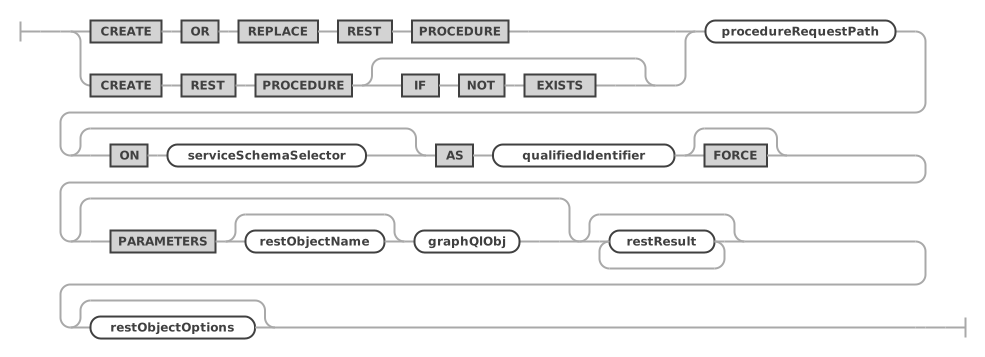
createRestProcedureStatement:    (
        CREATE OR REPLACE REST PROCEDURE
        | CREATE REST PROCEDURE (
            IF NOT EXISTS
        )?
    ) procedureRequestPath (ON serviceSchemaSelector)? AS qualifiedIdentifier
        FORCE? (
        PARAMETERS restObjectName? graphQlObj
    )? restResult* restObjectOptions?
;

restResult:
    RESULT restResultName? graphQlObj
;
createRestProcedureStatement ::=
restResult ::=

A procedure has a RESULT for each of its result sets.
For serviceSchemaSelector and restObjectOptions, see CREATE REST VIEW. The JSON options are described in JSON Options for REST Objects.
Examples
The following example adds a REST procedure for the sakila.rewards_report database schema procedure. It assumes that a REST service /myService and a REST schema /sakila exist.
CREATE OR REPLACE REST PROCEDURE /rewardsReport
ON SERVICE /myService SCHEMA /sakila
AS sakila.rewards_report;
The following example adds a REST procedure for the sakila.film_in_stock database schema procedure, and specifies the list of parameters and the result returned by the procedure explicitly.
CREATE OR REPLACE REST PROCEDURE /filmInStock
ON SERVICE /myService SCHEMA /sakila
AS sakila.film_in_stock
PARAMETERS MyServiceSakilaFilmInStockParams {
    pFilmId: p_film_id @IN,
    pStoreId: p_store_id @IN,
    pFilmCount: p_film_count @OUT
}
RESULT MyServiceSakilaFilmInStock {
    inventoryId: inventory_id @DATATYPE("int")
};
The FORCE Flag for Procedures
In some cases, a REST procedure needs to be created before the database schema procedure exists. To make CREATE REST PROCEDURE succeed in this case, specify the FORCE flag.
CREATE REST FUNCTION
The CREATE REST FUNCTION statement adds REST endpoints for database schema stored functions. It uses the extended GraphQL syntax of REST data mapping views to describe the parameters and the result of the REST function.
Syntax
createRestFunctionStatement:    (
        CREATE OR REPLACE REST FUNCTION
        | CREATE REST FUNCTION (
            IF NOT EXISTS
        )?
    ) functionRequestPath (ON serviceSchemaSelector)? AS qualifiedIdentifier
        FORCE? (
        PARAMETERS restObjectName? graphQlObj
    )? restResult? restObjectOptions?
;
createRestFunctionStatement ::=
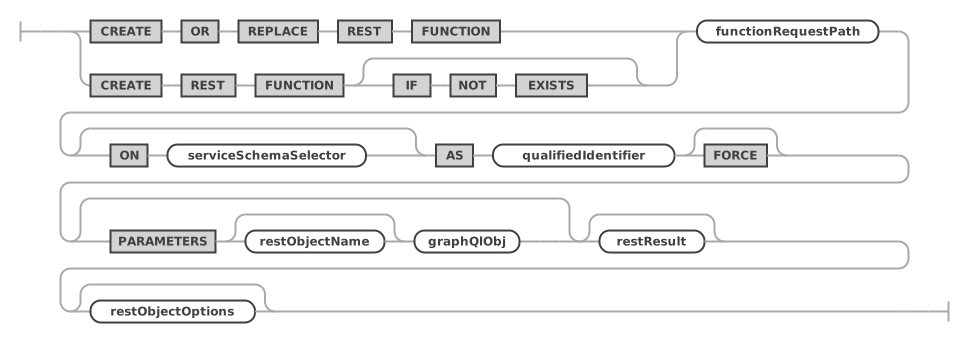
A function has at most one RESULT. For restResult, see CREATE REST PROCEDURE. For serviceSchemaSelector and restObjectOptions, see CREATE REST VIEW. The JSON options are described in JSON Options for REST Objects.
Examples
The following example adds a REST function for the sakila.inventory_in_stock database schema function.
CREATE OR REPLACE REST FUNCTION /inventoryInStock
ON SERVICE /myService SCHEMA /sakila
AS sakila.inventory_in_stock;
The FORCE Flag for Functions
In some cases, a REST function needs to be created before the database schema function exists. To make CREATE REST FUNCTION succeed in this case, specify the FORCE flag.
ALTER REST PROCEDURE
The ALTER REST PROCEDURE statement changes the REST endpoints of database schema stored procedures.
It uses the extended GraphQL syntax of REST data mapping views to describe the parameters and result sets of the REST procedure.
Syntax
alterRestProcedureStatement:
    ALTER REST PROCEDURE procedureRequestPath (
        ON serviceSchemaSelector
    )? (
        NEW REQUEST PATH newProcedureRequestPath
    )? (PARAMETERS restObjectName? graphQlObj)? restResult* restObjectOptions?
;
alterRestProcedureStatement ::=

For serviceSchemaSelector and restObjectOptions, see CREATE REST VIEW.
ALTER REST FUNCTION
The ALTER REST FUNCTION statement changes the REST endpoints of database schema stored functions.
It uses the extended GraphQL syntax of REST data mapping views to describe the parameters and the result of the REST function.
Syntax
alterRestFunctionStatement:
    ALTER REST FUNCTION functionRequestPath (
        ON serviceSchemaSelector
    )? (
        NEW REQUEST PATH newFunctionRequestPath
    )? (PARAMETERS restObjectName? graphQlObj)? restResult* restObjectOptions?
;
alterRestFunctionStatement ::=

For serviceSchemaSelector and restObjectOptions, see CREATE REST VIEW.
DROP REST PROCEDURE
The DROP REST PROCEDURE statement drops an existing REST procedure.
Syntax
dropRestProcedureStatement:
    DROP REST PROCEDURE (
        IF EXISTS
    )? procedureRequestPath (FROM serviceSchemaSelector)?
;
dropRestProcedureStatement ::=

Examples
DROP REST PROCEDURE /filmInStock
FROM SERVICE /myService SCHEMA /sakila;
DROP REST FUNCTION
The DROP REST FUNCTION statement drops an existing REST function.
Syntax
dropRestFunctionStatement:
    DROP REST FUNCTION (
        IF EXISTS
    )? functionRequestPath (FROM serviceSchemaSelector)?
;
dropRestFunctionStatement ::=

Examples
DROP REST FUNCTION /inventoryInStock
FROM SERVICE /myService SCHEMA /sakila;
SHOW REST PROCEDURES
The SHOW REST PROCEDURES statement lists all REST procedures of the given or the current REST schema.
Syntax
showRestProceduresStatement:
    SHOW REST PROCEDURES (
        (ON | FROM) serviceSchemaSelector
    )? formatClause?
;
showRestProceduresStatement ::=

With FORMAT=JSON, the result is one JSON array of the REST procedures, without their data mappings; see Lists in JSON.
Examples
The following example lists all REST procedures of the given REST schema.
SHOW REST PROCEDURES FROM SERVICE /myService SCHEMA /sakila;
SHOW REST FUNCTIONS
The SHOW REST FUNCTIONS statement lists all REST functions of the given or the current REST schema.
Syntax
showRestFunctionsStatement:
    SHOW REST FUNCTIONS (
        (ON | FROM) serviceSchemaSelector
    )? formatClause?
;
showRestFunctionsStatement ::=

With FORMAT=JSON, the result is one JSON array of the REST functions, without their data mappings; see Lists in JSON.
Examples
The following example lists all REST functions of the given REST schema.
SHOW REST FUNCTIONS FROM SERVICE /myService SCHEMA /sakila;
SHOW CREATE REST PROCEDURE
The SHOW CREATE REST PROCEDURE statement shows the DDL statement for the given REST procedure.
Syntax
showCreateRestProcedureStatement:
    SHOW CREATE REST PROCEDURE procedureRequestPath (
        (ON | FROM) serviceSchemaSelector
    )? formatClause?
;
showCreateRestProcedureStatement ::=

For formatClause, see SHOW CREATE ... FORMAT=JSON.
Examples
The following example shows the DDL statement for the given REST procedure.
SHOW CREATE REST PROCEDURE /filmInStock ON SERVICE /myService SCHEMA /sakila;
SHOW CREATE REST FUNCTION
The SHOW CREATE REST FUNCTION statement shows the DDL statement for the given REST function.
Syntax
showCreateRestFunctionStatement:
    SHOW CREATE REST FUNCTION functionRequestPath (
        (ON | FROM) serviceSchemaSelector
    )? formatClause?
;
showCreateRestFunctionStatement ::=

For formatClause, see SHOW CREATE ... FORMAT=JSON.
Examples
The following example shows the DDL statement for the given REST function.
SHOW CREATE REST FUNCTION /inventoryInStock ON SERVICE /myService SCHEMA /sakila;