REST Views
Create, change, list, and drop REST data mapping views, which serve tables and views as JSON documents, define their structure with the extended GraphQL syntax, and set the options of REST objects.
A REST data mapping view, or REST view, of the MariaDB REST Service (MRS) serves the data of database tables or views as JSON documents. Its structure is defined with an extended GraphQL syntax. To learn more about REST data mapping views, see REST Data Mapping Views.
In the statements, REST VIEW, REST DATA VIEW, REST MAPPING VIEW, and REST DATA MAPPING VIEW are synonyms.
CREATE REST VIEW
The CREATE REST DATA MAPPING VIEW statement adds REST endpoints for database schema tables or views. Their data is served as JSON documents.
The structure of the served JSON documents is defined with an extended GraphQL syntax, which lets you define even complex REST data mapping views in a simple and readable way.
Syntax
createRestViewStatement:    (
        CREATE OR REPLACE REST DATA? MAPPING? VIEW
        | CREATE REST DATA? MAPPING? VIEW (
            IF NOT EXISTS
        )?
    ) viewRequestPath (ON serviceSchemaSelector)? AS qualifiedIdentifier (
        CLASS restObjectName
    )? graphQlCrudOptions? graphQlObj? restObjectOptions?
;

serviceSchemaSelector:
    (SERVICE serviceRequestPath)? SCHEMA schemaRequestPath
;

restObjectOptions: (
        enabledDisabledPrivate
        | authenticationRequired
        | itemsPerPage
        | jsonOptions
        | comments
        | metadata
        | restViewMediaType
        | restViewFormat
        | restViewAuthenticationProcedure
    )+
;
createRestViewStatement ::=
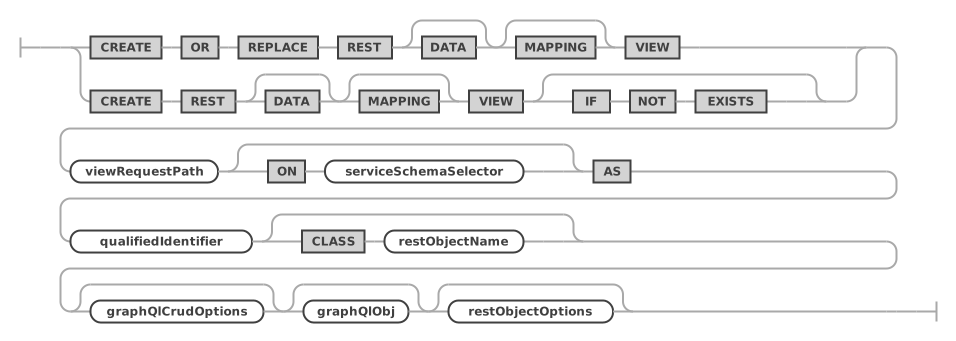
serviceSchemaSelector ::=

restObjectOptions ::=

The serviceSchemaSelector selects the REST service and the REST schema. Without it, the current REST service and schema are used, see USE REST. REST procedures and functions use the same serviceSchemaSelector and restObjectOptions.
Examples
The following example adds a REST data mapping view for the sakila.city database schema table.
CREATE REST VIEW /city
ON SERVICE /myService SCHEMA /sakila
AS `sakila`.`city` {
    cityId: city_id @SORTABLE,
    city: city,
    countryId: country_id,
    lastUpdate: last_update
}
AUTHENTICATION REQUIRED;
A query of the REST data mapping view with the TypeScript SDK returns the following JSON document.
ts> myService.sakila.city.findFirst();
{
   "city": "A Corua (La Corua)",
   "links": [
      {
         "rel": "self",
         "href": "/myService/sakila/city/1"
      }
   ],
   "cityId": 1,
   "countryId": 87,
   "lastUpdate": "2006-02-15 04:45:25.000000",
   "_metadata": {
      "etag": "EE93452B41984F3F5BBB0395CCB2CED00F5C748FEEA4A36CCD749CC3F85B7CEA"
   }
}
The following example adds the referenced table sakila.country to the REST data mapping view.
CREATE OR REPLACE REST VIEW /city
ON SERVICE /myService SCHEMA /sakila
AS `sakila`.`city` {
    cityId: city_id @SORTABLE,
    city: city,
    countryId: country_id,
    lastUpdate: last_update,
    country: sakila.country {
        countryId: country_id @SORTABLE,
        country: country,
        lastUpdate: last_update
    }
}
AUTHENTICATION REQUIRED;
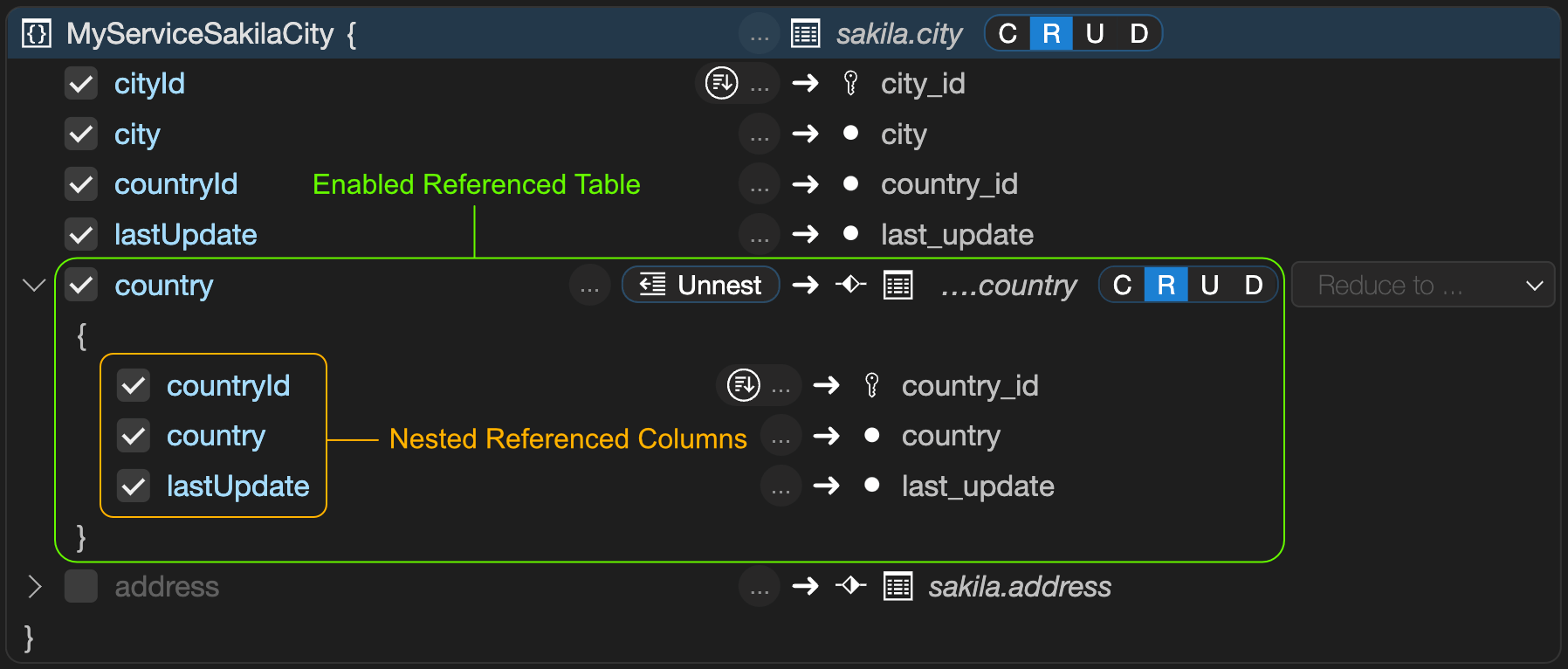
This is what the REST data mapping view looks like in the interactive REST Object dialog of MariaDB Shell for VS Code.
A TypeScript SDK query against the new REST endpoint returns the following JSON document.
ts> myService.sakila.city.findFirst();
{
    "city": "A Corua (La Corua)",
    "links": [
        {
            "rel": "self",
            "href": "/myService/sakila/city/1"
        }
    ],
    "cityId": 1,
    "country": {
        "country": "Spain",
        "countryId": 87,
        "lastUpdate": "2006-02-15 04:44:00.000000"
    },
    "countryId": 87,
    "lastUpdate": "2006-02-15 04:45:25.000000",
    "_metadata": {
        "etag": "FFA2187AD4B98DF48EC40B3E807E0561A71D02C2F4F5A3B953AA6CB6E41CAD16"
    }
}
Preconditions
You define a REST data mapping view against a set of tables related by primary key (PK), foreign key (FK), or unique key (UK) constraints. The following rules apply:
- The constraints must be declared in the database.
- The relationship type can be 1-to-1, 1-to-N, or N-to-M (using a mapping table with two FKs). You can think of an N-to-M relationship as the combination of a 1-to-N and a 1-to-1 relationship.
- Columns of two or more tables with 1-to-1 or N-to-1 relationships can be merged into the same JSON object with
@UNNEST. Otherwise, a nested JSON object is created. - Tables with a 1-to-N relationship create a nested JSON array.
- Each item in the data mapping view is one JSON object, which is typically a hierarchy of nested objects and arrays.
- Each application object is built from values that originate from one or more rows of the underlying tables of the view. Typically, each table contributes one (nested) JSON object.
Enabling or Disabling a REST View
The enabledDisabledPrivate option specifies whether the REST data mapping view is enabled, disabled, or private when it is created.
Setting a REST data mapping view to private disables public access through HTTPS, but keeps it available for private access from MRS scripts.
Requiring Authentication
The authenticationRequired option specifies whether a REST data mapping view requires authentication before its REST endpoints can be accessed. The same option applies to REST schemas, REST procedures and functions, and content sets and files.
authenticationRequired:
    AUTHENTICATION NOT? REQUIRED
;
authenticationRequired ::=

Specifying the Page Size for REST Views
The itemsPerPage option specifies the number of items returned for queries run against the REST data mapping view.
Setting the Media Type for REST Views
If the REST data mapping view returns a specific MIME type, set it with the restViewMediaType option. To have MRS detect the type from the content, use the AUTODETECT option.
restViewMediaType:
    MEDIA TYPE (
        textStringLiteral
        | AUTODETECT
    )
;
restViewMediaType ::=

Setting the Result Format for REST Views
A REST data mapping view returns one of the following formats, set with the restViewFormat option:
FEED: a list of result JSON objects.ITEM: a single result item.MEDIA: a single BLOB item. TherestViewMediaTypeoption sets the corresponding MIME type in this case.
restViewFormat:
    FORMAT (FEED | ITEM | MEDIA)
;
restViewFormat ::=

Using a Custom Authentication Procedure for a REST View
If the built-in authentication handling doesn't cover the use case of a REST data mapping view, a stored procedure can handle the authentication check for the given user and the requested CRUD operation.
The stored procedure has to be in the same schema as the database schema object, and it has to accept the following parameters: (IN user_id BINARY(16), IN schema VARCHAR(255), IN object VARCHAR(255), IN crud_operation VARCHAR(4)). It needs to return true or false.
restViewAuthenticationProcedure:
    AUTHENTICATION PROCEDURE qualifiedIdentifier
;
restViewAuthenticationProcedure ::=

Defining the GraphQL Definition for a REST View
The GraphQL definition maps the columns of the table or view, and of the tables it references, to the fields of the JSON documents. REST procedures and functions use the same syntax to describe their parameters and results.
graphQlObj:
    OPEN_CURLY graphQlPair (COMMA graphQlPair)* CLOSE_CURLY
    | OPEN_CURLY CLOSE_CURLY
;

graphQlCrudOptions: (
        AT_INSERT
        | AT_NOINSERT
        | AT_UPDATE
        | AT_NOUPDATE
        | AT_DELETE
        | AT_NODELETE
        | AT_CHECK
        | AT_NOCHECK
    )+
;

graphQlPair:
    graphQlPairKey COLON graphQlPairValue (
        AT_IN
        | AT_OUT
        | AT_INOUT
    )? graphQlValueOptions? (
        AT_DATATYPE OPEN_PAR graphQlDatatypeValue CLOSE_PAR
    )? graphQlCrudOptions? graphQlValueJsonSchema? graphQlObj?
;

graphQlValueOptions: (
        AT_NOCHECK
        | AT_SORTABLE
        | AT_NOFILTERING
        | AT_ROWOWNERSHIP
        | AT_UNNEST
        | AT_KEY
    )+
;

graphQlValue:
    qualifiedIdentifier
    | graphQlObj
;

graphQlValueJsonSchema:
    JSON SCHEMA jsonValue
;
graphQlObj ::=

graphQlCrudOptions ::=

graphQlPair ::=

graphQlValueOptions ::=

graphQlValue ::=

graphQlValueJsonSchema ::=

The data type given with @DATATYPE can be written as an identifier or in single or double quotes, for example @DATATYPE(int), @DATATYPE('varchar(20)'), or @DATATYPE("varchar(20)").
REST View Comments and Metadata
The comments hold a description of the REST view, see REST Service Comments. The metadata holds any JSON data. A front end can consume it to render certain attributes dynamically, for example a specific icon or color. See REST Service Metadata.
JSON Options for REST Objects
The jsonOptions set a number of specific options for the REST view. Specify the MERGE keyword to merge the given options with the existing options. Without MERGE, the given options replace all existing options.
The following options can be set for most database object endpoints, REST views as well as REST procedures and functions, in a JSON object in the OPTIONS clause (indentation means JSON object nesting):
httploggingmetadatagtid(bool)- If
true, embeds the GTID assigned to database change operations into the metadata of the response JSON object. Enable it with replication topologies, so that changes made to an object are reflected when it is read, regardless of where the read happens. The default istrue.
- If
sqlQueryembedWait(bool)- If
true, performs the wait described in thewaitoption directly in the database query, instead of in a separate statement before it.
- If
timeout(number)- The number of milliseconds to wait for the database query to execute before it is terminated. The default is taken from the global
sqlQuery.timeoutoption.
- The number of milliseconds to wait for the database query to execute before it is terminated. The default is taken from the global
wait(bool)- When data is queried from a secondary server, controls whether to wait until the transaction GTID specified in the
asofclause has been applied. This enables read-your-own-writes semantics.
- When data is queried from a secondary server, controls whether to wait until the transaction GTID specified in the
resultcacheTimeToLive(double)- Enables caching for GET requests. Specifies the number of seconds (including fractions of a second) to keep the response in the cache, after which it is discarded until a new request comes in, or when the cache fills up.
includeLinks(bool)- Whether to include links in returned JSON objects. The default is
true.
- Whether to include links in returned JSON objects. The default is
returnInternalErrorDetails(bool)- Controls debug logging.
disableAutomaticGrants(bool)- When you create or alter REST objects, a list of privileges is automatically granted to the
mariadb_rest_service_data_providerrole, so that the MariaDB REST Daemon can access the referenced data in MariaDB Server. In some cases, you may want to turn off this automatic grant of privileges and use thegrantsoption to specify a custom list of grants.
- When you create or alter REST objects, a list of privileges is automatically granted to the
grants(object | list)- Either a single grant object or a list of grant objects that are executed in addition to the automatically generated grant statements for the REST object. These additional grants are needed when, for example, a stored procedure works with database tables or views, or calls other procedures and functions.
privileges(string | list)- A single privilege name, a list of privilege names, or a list of privilege objects. The following privileges are allowed: "ALTER" | "ALTER ROUTINE" | "CREATE" | "CREATE ROUTINE" | "CREATE TEMPORARY TABLES" | "CREATE VIEW" | "DELETE" | "DROP" | "EVENT" | "EXECUTE" | "INDEX" | "INSERT" | "LOCK TABLES" | "REFERENCES" | "SELECT" | "SHOW DATABASES" | "SHOW VIEW" | "TRIGGER" | "UPDATE" | "USAGE". A privilege object has two fields,
privilegeandcolumnList, the latter holding a list of column names.
- A single privilege name, a list of privilege names, or a list of privilege objects. The following privileges are allowed: "ALTER" | "ALTER ROUTINE" | "CREATE" | "CREATE ROUTINE" | "CREATE TEMPORARY TABLES" | "CREATE VIEW" | "DELETE" | "DROP" | "EVENT" | "EXECUTE" | "INDEX" | "INSERT" | "LOCK TABLES" | "REFERENCES" | "SELECT" | "SHOW DATABASES" | "SHOW VIEW" | "TRIGGER" | "UPDATE" | "USAGE". A privilege object has two fields,
objectType(string)- The object type, either "TABLE" | "FUNCTION" | "PROCEDURE".
schema(string)- The name of the database schema or
*, without backticks.
- The name of the database schema or
object(string)- The name of the database table, view, procedure, or function, or
*, without backticks.
- The name of the database table, view, procedure, or function, or
The following example grants the SELECT privilege on the mariadb_rest_service.mrs_user table.
{
    "grants": {
        "privileges": "SELECT",
        "schema": "mariadb_rest_service",
        "object": "mrs_user"
    }
}
The following example grants the SELECT and UPDATE privileges on the mariadb_rest_service.mrs_user table.
{
    "grants": {
        "privileges": [ "SELECT", "UPDATE" ],
        "schema": "mariadb_rest_service",
        "object": "mrs_user" }
}
The following example grants two privileges.
{
    "grants": [
        {
            "privileges": "SELECT",
            "schema": "mariadb_rest_service",
            "object": "msm_schema_version"
        },
        {
            "privileges": "SELECT",
            "schema": "mariadb_rest_service",
            "object": "mrs_user_schema_version"
        }
    ]
}
The following example grants the SELECT privilege only on the id and name columns of the mariadb_rest_service.mrs_user table.
{
    "grants": {
        "privileges": [
            {
                "privilege": "SELECT",
                "columnList": [
                    "id",
                    "name"
                ]
            }
        ],
        "schema": "mariadb_rest_service",
        "object": "mrs_user"
    }
}
ALTER REST VIEW
The ALTER REST DATA MAPPING VIEW statement changes an existing REST data mapping view. To design the GraphQL definition, see Defining the GraphQL Definition for a REST View. The options are the restObjectOptions of CREATE REST VIEW.
Syntax
alterRestViewStatement:
    ALTER REST DATA? MAPPING? VIEW viewRequestPath (
        ON serviceSchemaSelector
    )? (NEW REQUEST PATH newViewRequestPath)? (
        CLASS restObjectName graphQlCrudOptions? graphQlObj?
    )? restObjectOptions?
;
alterRestViewStatement ::=

Examples
The following example changes the REST data mapping view /city for the sakila.city database schema table and sets a new list of fields.
ALTER REST VIEW /city
ON SERVICE /myService SCHEMA /sakila
CLASS MyServiceSakilaCity {
    cityId: city_id @SORTABLE,
    city: city
};
DROP REST VIEW
The DROP REST DATA MAPPING VIEW statement drops an existing REST data mapping view.
Syntax
dropRestViewStatement:
    DROP REST DATA? MAPPING? VIEW (
        IF EXISTS
    )? viewRequestPath (FROM serviceSchemaSelector)?
;
dropRestViewStatement ::=

Examples
The following example drops the REST data mapping view with the request path /city.
DROP REST VIEW /city
FROM SERVICE /myService SCHEMA /sakila;
SHOW REST VIEWS
The SHOW REST DATA MAPPING VIEWS statement lists all REST data mapping views of the given or the current REST schema.
Syntax
showRestViewsStatement:
    SHOW REST DATA? MAPPING? VIEWS (
        (ON | FROM) serviceSchemaSelector
    )? formatClause?
;
showRestViewsStatement ::=

With FORMAT=JSON, the result is one JSON array of the REST views, without their data mappings; see Lists in JSON.
Examples
The following example lists all REST data mapping views of the given REST schema.
SHOW REST VIEWS FROM SERVICE /myService SCHEMA /sakila;
SHOW CREATE REST VIEW
The SHOW CREATE REST DATA MAPPING VIEW statement shows the DDL statement for the given REST data mapping view.
Syntax
showCreateRestViewStatement:
    SHOW CREATE REST DATA? MAPPING? VIEW viewRequestPath (
        (ON | FROM) serviceSchemaSelector
    )? formatClause?
;
showCreateRestViewStatement ::=

For formatClause, see SHOW CREATE ... FORMAT=JSON.
Examples
The following example shows the DDL statement for the given REST data mapping view.
SHOW CREATE REST VIEW /city ON SERVICE /myService SCHEMA /sakila;