Configuring MRS
Configure a MariaDB server for the MariaDB REST Service: deploy the MRS metadata schema with CONFIGURE REST METADATA, grant the MRS roles, and connect MariaDB REST Daemon instances.
To configure the MariaDB REST Service (MRS), follow these steps:
- Deploy a MariaDB Server.
- Configure the MRS metadata schema on the server.
- Grant the MRS roles to the MariaDB accounts that work with MRS.
- Run one or more MariaDB REST Daemon instances that serve the REST endpoints.
After these steps, MRS is fully configured, and you can add REST services.
Configuring the MRS Metadata Schema
MRS stores its configuration in the mariadb_rest_service database schema. To deploy the metadata schema, use MariaDB Shell for VS Code or MariaDB Shell, as described in this section. The metadata schema uses MariaDB's UUID type and MariaDB roles, so MRS needs a MariaDB Server: a REST SQL statement run on a session to a MySQL server fails with an error that says so.
The MariaDB account that configures the metadata schema needs the privileges to create database schemas and roles. It is common practice to use the root account or a dedicated dba account with ALL PRIVILEGES and WITH GRANT OPTION.
Using MariaDB Shell for VS Code
- Start VS Code, install the MariaDB Shell for VS Code extension, and add a DB connection to the MariaDB Server that you want to configure for MRS.
- Right-click the connection in the DATABASE CONNECTIONS view and select Configure Instance for MariaDB REST Service Support.
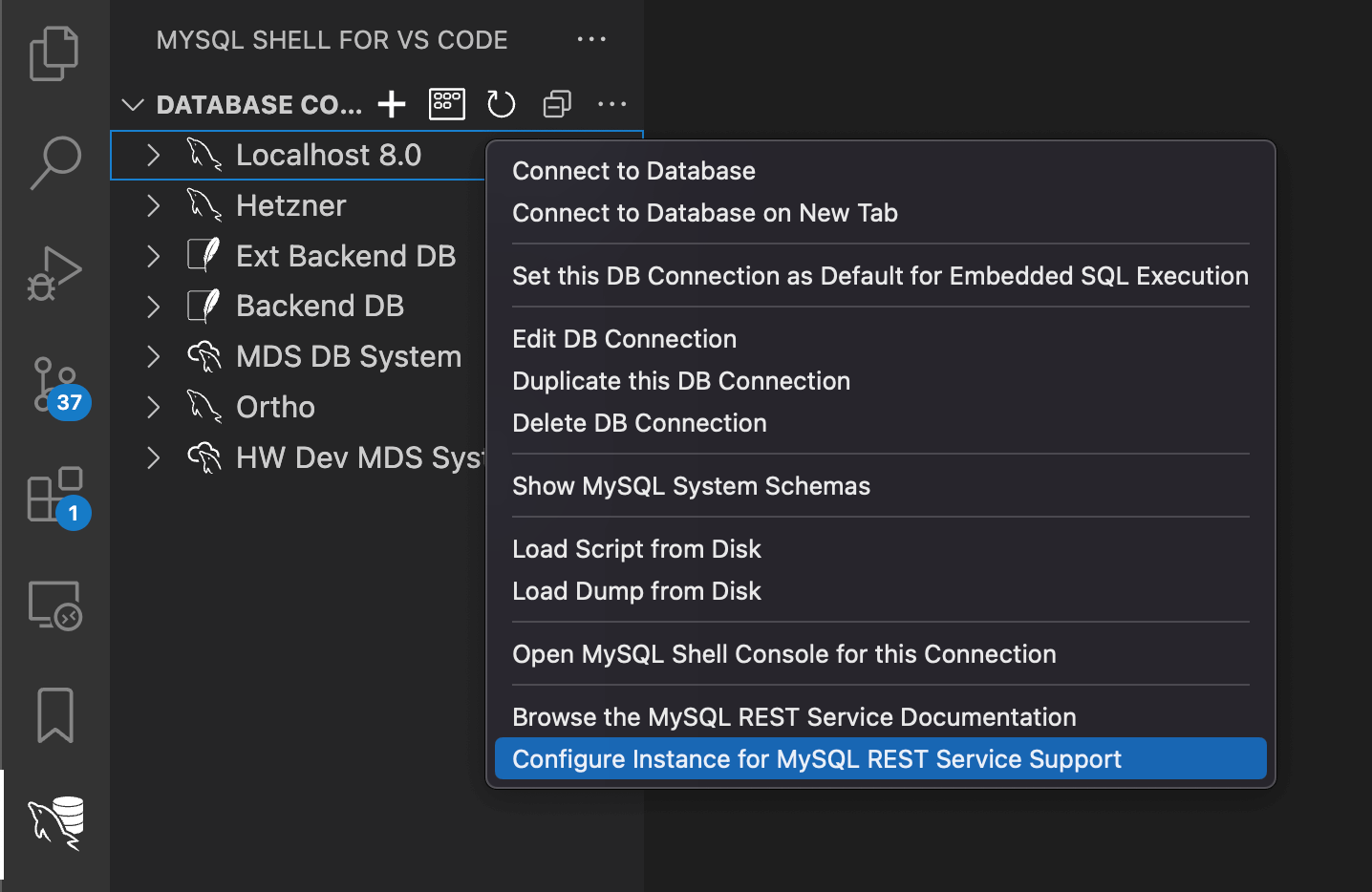
The MRS metadata schema is now configured.
Using MariaDB Shell
In MariaDB Shell, you configure the metadata schema with the REST SQL statement CONFIGURE REST METADATA. MariaDB Shell runs REST SQL statements in SQL mode, like any other SQL statement.
The following example connects to a local MariaDB Server with the dba account:
mariadb-shell dba@localhost --sql
Then it configures the metadata schema:
CONFIGURE REST METADATA;
Query OK, 0 rows affected
REST metadata configured successfully.
The statement also takes options that enable or disable MRS and set global configuration options, for example for authentication throttling. See CONFIGURE REST METADATA.
To check the configuration, run SHOW REST STATUS. It reports whether the metadata schema is configured and enabled, how many REST services are enabled, and whether the metadata schema can be updated:
SHOW REST STATUS;
Updating the MRS Metadata Schema
When the metadata schema on a server is older than the version that MariaDB Shell deploys, CONFIGURE REST METADATA leaves it as it is and reports that it needs an update. The other REST SQL statements refuse to work on an outdated metadata schema. To update it, add UPDATE IF AVAILABLE:
CONFIGURE REST METADATA UPDATE IF AVAILABLE;
Before the update, MariaDB Shell dumps the metadata schema to the plugin_data/msm_plugin/backups folder of its user configuration and loads the dump again if the update fails. The steps are logged to plugin_data/msm_plugin/msm_schema_update_log.txt.
One Metadata Schema per Customer
A server can hold several MRS metadata schemas, for example when a cloud provider runs one MariaDB Server for several customers. Each metadata schema adds a prefix or a postfix to the name mariadb_rest_service, and gets its own roles with the same prefix and postfix. Deploy one with the SCHEMA option of CONFIGURE REST METADATA:
CONFIGURE REST METADATA SCHEMA acme_mariadb_rest_service;
This creates the schema acme_mariadb_rest_service and the roles acme_mariadb_rest_service_admin, acme_mariadb_rest_service_dev, and so on. Grant the customer's accounts only these roles, and make them their default roles. A customer's accounts then see only the customer's metadata schema, and the REST statements find it without further setup. The MSM plugin deploys the same schema with msm.deploySchema() and the substitutions option {"schema_prefix": "acme_"}.
An account that can see several metadata schemas chooses one with USE REST METADATA SCHEMA. SHOW REST METADATA SCHEMAS lists them.
Removing the MRS Metadata Schema
To remove MRS from a server, drop the metadata schema with a MariaDB account that has the privilege to drop it:
DROP SCHEMA mariadb_rest_service;
Dropping the metadata schema deletes the definitions of all REST services, REST users, and REST roles on the server. The application data in your own schemas stays.
Granting Users Access to MRS
After the metadata schema is configured, grant access to it to every MariaDB account that works with MRS. In addition, the MRS data provider role needs access to the application data that the REST endpoints expose, so that MRS can serve it.
MRS User Roles
MRS has a multi-tiered access model. Configuring the metadata schema creates the following roles, which you grant to MariaDB accounts:
| Access Level | Role Name | Description |
|---|---|---|
| Root | - | Accounts with ALL PRIVILEGES, like the default root account, have full access to all features. |
| REST Service Admin | mariadb_rest_service_admin | Full access to all features of MRS. |
| REST Schema Admin | mariadb_rest_service_schema_admin | Adds REST schemas and endpoints to existing REST services. |
| REST Service Developer | mariadb_rest_service_dev | Defines REST endpoints for existing REST schemas. |
| REST Service User | mariadb_rest_service_user | Accesses REST endpoints as a MariaDB account, through MariaDB internal authentication. |
Grant a role with the GRANT statement. A role takes effect in a session only after it is activated with SET ROLE. To have it activated automatically when the account connects, which MariaDB Shell for VS Code requires, make it the account's default role with SET DEFAULT ROLE.
The following example grants the mariadb_rest_service_admin role to the dba account and makes it the account's default role:
GRANT 'mariadb_rest_service_admin' TO 'dba'@'%';
SET DEFAULT ROLE mariadb_rest_service_admin FOR 'dba'@'%';
MariaDB activates one role per session, and an account has one default role. To give an account the privileges of several roles at once, grant them to a role of your own and make that role the default role.
MRS Provider Roles
Two further roles are used by the MariaDB REST Daemon to operate MRS:
| Access Level | Role Name | Description |
|---|---|---|
| Metadata Schema Read-Only | mariadb_rest_service_meta_provider | Used by the MariaDB REST Daemon to read the REST services it serves from the metadata schema. |
| Application Data Access | mariadb_rest_service_data_provider | Used by the MariaDB REST Daemon to read and write the application data that the REST services expose. It applies to all REST users authenticated through the MRS vendor and through OAuth2 vendors. REST users authenticated through MariaDB internal authentication, vendor MariaDB Internal, use their own privileges. |
When you define a REST endpoint, make sure that the mariadb_rest_service_data_provider role has the privileges on the database objects behind it:
- For REST views on a table or view, the privileges are granted automatically.
- For REST procedures and REST functions, the
EXECUTEprivilege is granted automatically. If the routine calls other routines or accesses other database objects, grant the privileges on them tomariadb_rest_service_data_provideryourself.
The following example exposes the procedure test.my_procedure, which calls the procedure test.my_sub_procedure. The script creates both procedures and defines the REST endpoint /myService/test/myProcedure. The EXECUTE privilege on test.my_procedure is granted automatically, but the endpoint would still fail, because the privilege on test.my_sub_procedure is missing. The final GRANT statement adds it, and the endpoint works.
CREATE SCHEMA IF NOT EXISTS `test`;

DELIMITER %%
DROP PROCEDURE IF EXISTS `test`.`my_procedure`%%
CREATE PROCEDURE `test`.`my_procedure`(IN arg1 INTEGER, OUT arg2 INTEGER)
SQL SECURITY DEFINER
NOT DETERMINISTIC
BEGIN
    CALL `test`.`my_sub_procedure`(arg1, arg2);
END%%

DROP PROCEDURE IF EXISTS `test`.`my_sub_procedure`%%
CREATE PROCEDURE `test`.`my_sub_procedure`(IN arg1 INTEGER, OUT arg2 INTEGER)
SQL SECURITY DEFINER
NOT DETERMINISTIC
BEGIN
    SET arg2 = arg1 * 2;
END%%
DELIMITER ;

CREATE OR REPLACE REST SERVICE /myService;
CREATE REST SCHEMA /test ON SERVICE /myService FROM test;
CREATE REST PROCEDURE /myProcedure
    ON SERVICE /myService SCHEMA /test
    AS `test`.`my_procedure`;

GRANT EXECUTE ON PROCEDURE `test`.`my_sub_procedure` TO 'mariadb_rest_service_data_provider';
Running the MariaDB REST Daemon
The MariaDB REST Daemon serves the REST endpoints. It reads the REST services from the metadata schema and answers the HTTPS requests for them, running the SQL on the MariaDB Server. You can run several instances against the same metadata schema. See Architecture.
Each instance registers itself in the metadata schema when it starts and checks in regularly. To list the instances, run SHOW REST DAEMONS:
SHOW REST DAEMONS;
An instance that runs in developer mode also serves the REST services that are still in development for a given developer. See Development Setup. To remove an instance that no longer runs from the metadata, use DROP REST DAEMON.
The installation and bootstrap of the MariaDB REST Daemon are documented with its release.
MariaDB Accounts for the MariaDB REST Daemon
The MariaDB REST Daemon connects to the MariaDB Server with an account that has the MRS provider roles:
- With one account, the MariaDB REST Daemon uses it for both the metadata schema and the application data. The account needs both the
mariadb_rest_service_meta_providerand themariadb_rest_service_data_providerrole. - With two accounts, the MariaDB REST Daemon uses one for the metadata schema and the other for the application data. Grant
mariadb_rest_service_meta_providerto the first account andmariadb_rest_service_data_providerto the second.
To create the two accounts by hand, connect to the server with MariaDB Shell or MariaDB Shell for VS Code and run the following statements, with your own account names, host, and passwords. Each account gets its role as default role, so that the role is active when the MariaDB REST Daemon connects:
CREATE USER 'mrs_metadata'@'<daemon_host>' IDENTIFIED BY '<password>';
GRANT 'mariadb_rest_service_meta_provider' TO 'mrs_metadata'@'<daemon_host>';
SET DEFAULT ROLE mariadb_rest_service_meta_provider FOR 'mrs_metadata'@'<daemon_host>';

CREATE USER 'mrs_data'@'<daemon_host>' IDENTIFIED BY '<password>';
GRANT 'mariadb_rest_service_data_provider' TO 'mrs_data'@'<daemon_host>';
SET DEFAULT ROLE mariadb_rest_service_data_provider FOR 'mrs_data'@'<daemon_host>';