VS Code Dialog Reference
Reference of the REST service, REST schema, and REST object dialogs of MariaDB Shell for VS Code, with the properties and advanced JSON options they set.
This page describes the dialogs that MariaDB Shell for VS Code offers for the MariaDB REST Service (MRS).
MRS Service Dialog
REST Service Properties
Each REST service has the following properties:
| Option | Description |
|---|---|
| MRS Service Path | The URL context root of the service. |
| Comments | Comments that describe the service. |
| Host Name | If specified, only requests for this host are served. |
| Supported Protocols | The supported protocols, HTTPS by default. |
| Enabled | Whether the MariaDB REST Daemon serves the service. |
| Options | Advanced options in JSON format. |
REST Service Advanced Options
You can set the following advanced options in JSON format:
headers: A JSON object with one or more HTTP header names as keys and their settings as values.http:allowedOrigin: If set toauto, the MariaDB REST Daemon sets the headerAccess-Control-Allow-Origindynamically to the domain that sends the request. Alternatively, set it to a specific domain, for examplehttps://example.com, or to a list of domains, for example["https://example.com", "https://example.net"].
logging:exceptions: If set totrue, exceptions are logged.requests:body: If set totrue, the full body of all requests is logged.headers: If set totrue, only the headers of all requests are logged.
response:body: If set totrue, the full body of all responses is logged.headers: If set totrue, only the headers of all responses are logged.
returnInternalErrorDetails: If set totrue, the causes of errors with code 500 are sent to the client.includeLinksInResults: If set tofalse, the results don't include navigation links.
Default REST Service Options
The following example shows the options that a new REST service gets by default.
These options are meant for development. Change them before you use the REST service in production.
With allowedOrigin set to auto, the MariaDB REST Daemon sets the header Access-Control-Allow-Origin dynamically to the domain that sends the request. This works around the cross-origin resource sharing (CORS) checks of web browsers during development.
{
    "headers": {
        "Access-Control-Allow-Credentials": "true",
        "Access-Control-Allow-Headers": "Content-Type, Authorization, X-Requested-With, Origin, X-Auth-Token",
        "Access-Control-Allow-Methods": "GET, POST, PUT, DELETE, OPTIONS"
    },
    "http": {
        "allowedOrigin": "auto"
    },
    "logging": {
        "exceptions": true,
        "request": {
            "body": true,
            "headers": true
        },
        "response": {
            "body": true,
            "headers": true
        }
    },
    "returnInternalErrorDetails": true
}
When you deploy a REST service in production, change the following settings:
- Set
allowedOriginto the domain or domains that the REST service runs on, for example"https://mydomain.com"on a production server. - Set
returnInternalErrorDetailstofalse. - Adjust the logging settings as needed.
MRS Schema Dialog
REST Schema Properties
Each REST schema has the following properties:
| Option | Description |
|---|---|
| MRS Service Path | The path of the REST service of the REST schema. |
| Comments | Comments that describe the REST schema. |
| REST Schema Path | The request path of the schema. It must start with /. |
| Schema Name | The name of the database schema. |
| Items per Page | The default number of items returned for requests on the REST objects of the schema. |
| Enabled | Whether the REST objects of the REST schema are exposed through the REST interface. |
| Requires Authentication | Whether authentication is required to access the REST objects of the REST schema. |
| Options | Additional options in JSON format. |
MRS Object Dialog
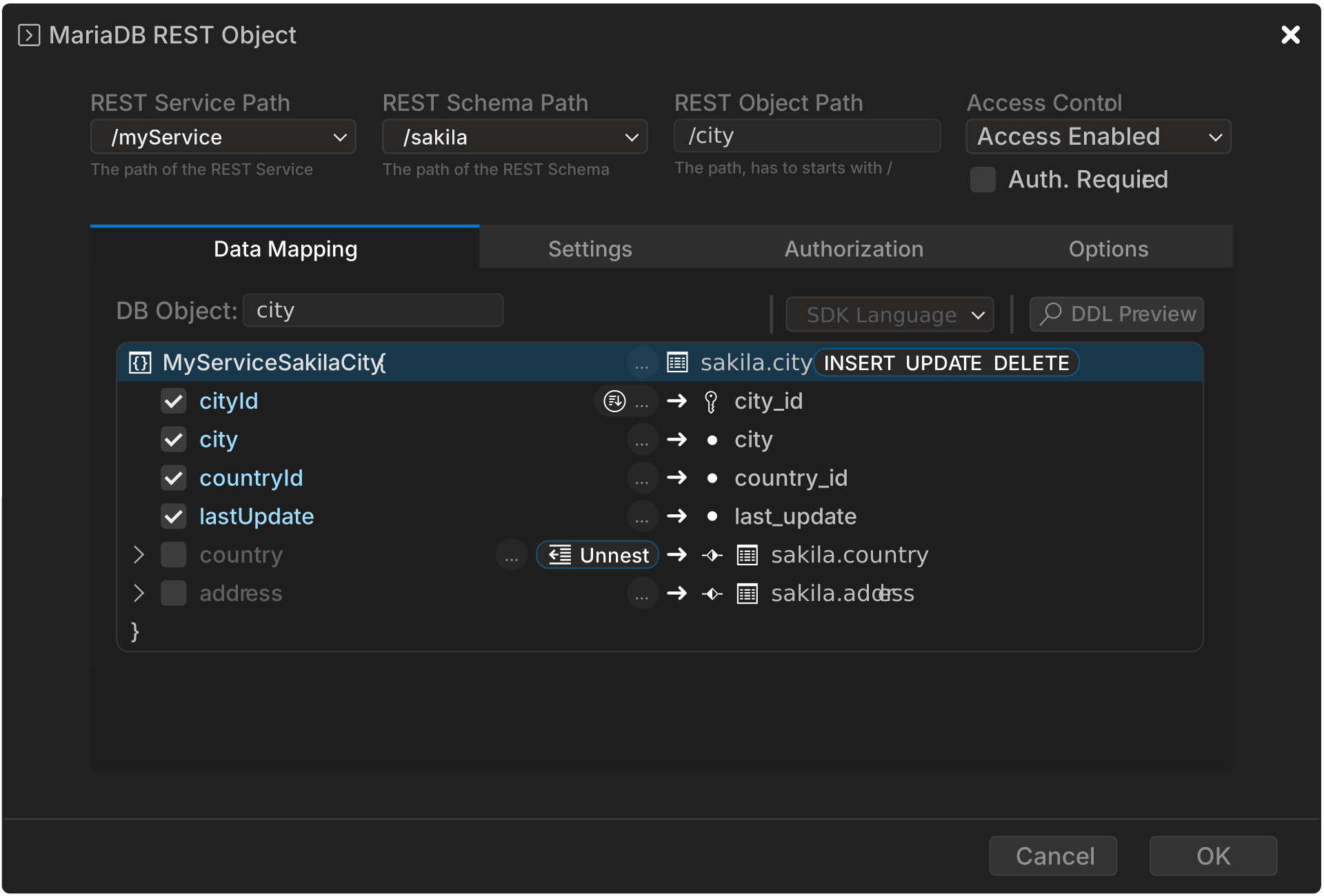
The dialog sets the following aspects of a REST object:
- Basic settings
- The database object that is exposed through MRS.
- The URL path of the REST object.
- Security
- Whether the object is public or requires authentication.
- The allowed CRUD operations.
- The allowed CRUD operations on referenced tables.
- Whether row ownership is enforced, for row-level security.
- Data mapping
- Which columns of the database object are exposed, and under which names.
- Which referenced tables are included, either nested, unnested, or reduced to a single field.