Examples
Build and deploy the example projects of the mrs plugin: the MRS Notes progressive web app and the MRS Scripts project with server-side rendering.
The mrs plugin of MariaDB Shell comes with example projects that show what you can build with the MariaDB REST Service (MRS). You find them in the examples folder of the repository.
- MRS Notes implements a simple progressive web app (PWA) that shows the features of MRS.
- MRS Scripts is a set of MRS scripts, including two examples of server-side rendering of HTML pages.
MRS Notes Example
The MRS Notes example is a simple note-taking application, built as a progressive web app, in which users share notes with each other.
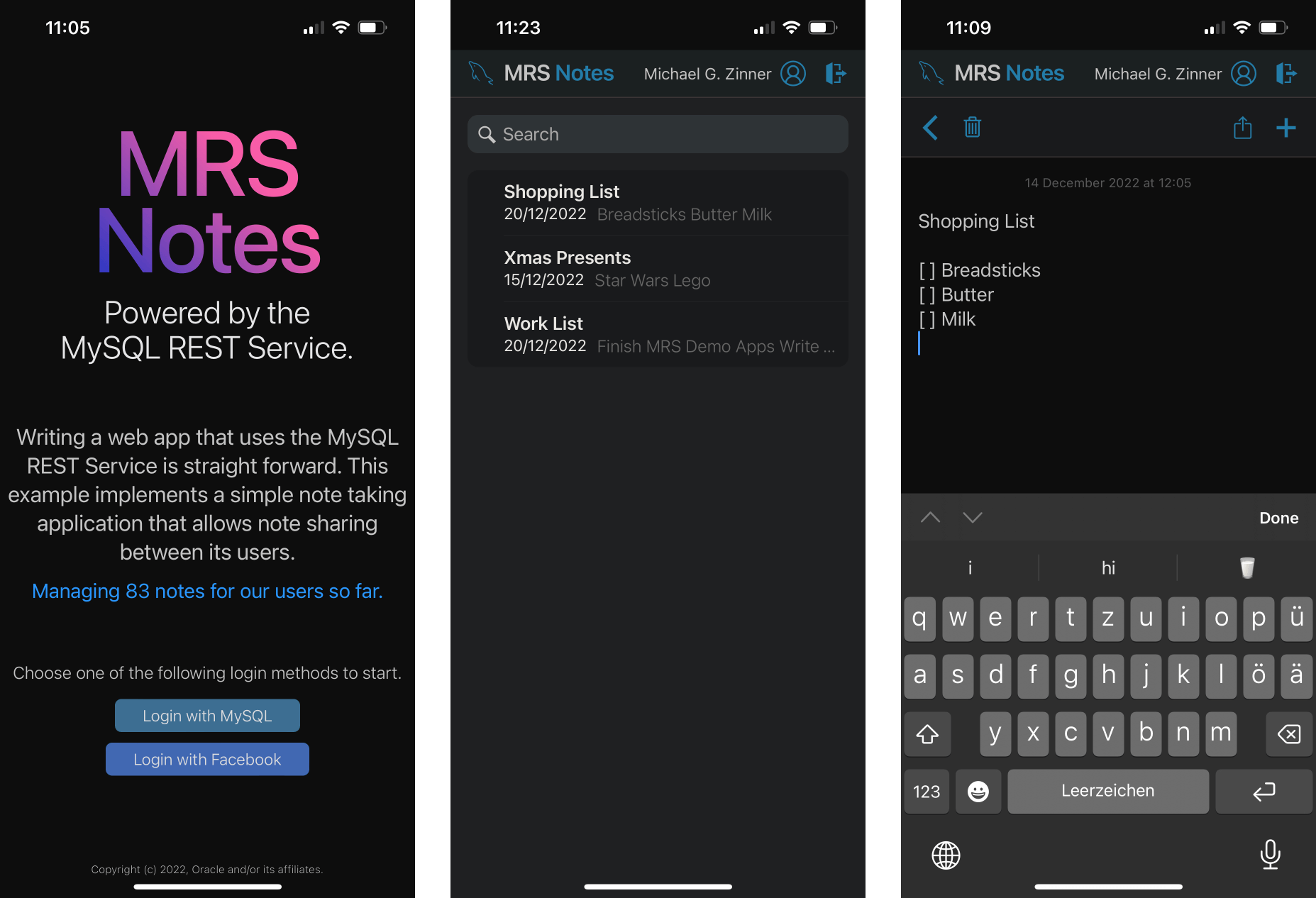
Developer Showcase
The example shows the following features:
- Accessing MRS REST endpoints from JavaScript and TypeScript code.
- Using the authentication REST endpoints of an MRS service for user management.
- Using JSON Web Tokens (JWT) to manage user sessions.
Quick Guide
To set up, build, and deploy the MRS Notes example, follow these steps. The sections below describe the example in more detail.
- Save the
mrs_notesproject folder to disk and open it in VS Code. - Configure MRS on your MariaDB Server.
- Create a REST service, for example
/myService. See Adding REST Services. - Deploy the
mrs_notesdatabase schema with the scriptdb_schema/mrs_notes.sql. See Deploying the Database Schema. - Load the REST schema definition
mrs_schema/mrsNotes.mrs.jsoninto the REST service. - Make sure that a MariaDB REST Daemon instance is running. See Running the MariaDB REST Daemon.
- Build and deploy the app, as described in Deploying the App.
mrsNotes.mrs.json is a REST schema dump in the JSON format of earlier MRS releases. Neither REST SQL nor the functions of the mrs plugin load this format. If your tools can't load it, create the REST schema and its objects for the mrs_notes schema with REST SQL, as described in Adding REST Services and Database Objects.
Deploying the App
The MRS Notes project implements a TypeScript app in which users create, change, and share notes.
- If you haven't done so in the quick guide, save the
mrs_notesproject folder to disk and open it in VS Code. - In the NPM SCRIPTS view of the sidebar, right-click
package.jsonand select Run Install. Alternatively, runnpm installin the TERMINAL tab to install the required node modules. - In the NPM SCRIPTS view, run the
buildscript ofpackage.json. It creates the folderdistwith all files needed for the deployment. - Right-click the
distfolder in the folders view and select Upload Folder to MariaDB REST Service. - In the REST content set dialog, set the Request Path of the app, for example
/app, and click OK to upload the files to the REST service. - Open the full path of the app in a web browser, for example
https://localhost:8443/myService/app/index.html.
Instead of steps 4 and 5, you can upload the dist folder with mrs.load.content_set() in MariaDB Shell. See Static Content and MRS Scripts.
Deploying the Database Schema
The mrs_notes database schema is the center of the project. It defines the structure of the data, and its tables store all the information that the users enter in the app.
To create the schema, run the SQL script db_schema/mrs_notes.sql with MariaDB Shell or with MariaDB Shell for VS Code. On the command line, run the following command in the mrs_plugin directory:
mariadb-shell dba@localhost --sql -f examples/mrs_notes/db_schema/mrs_notes.sql
Database Schema Diagram
The following diagram shows all components of the mrs_notes schema:
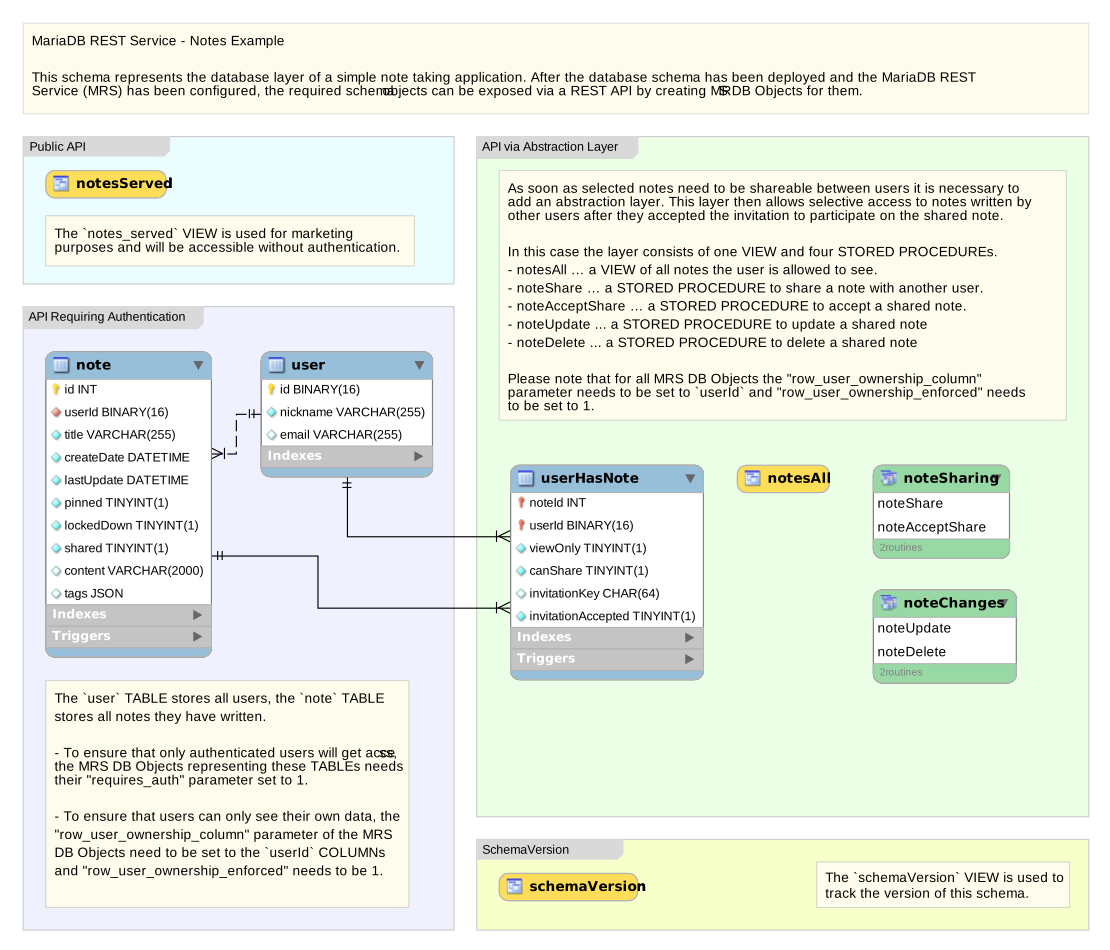
The most important table is note. It stores all notes that the users create.
The user table holds the nickname of each user, and the email address that receives the invitations to shared notes.
The user_has_note table manages the sharing of notes between users.
To make notes shareable between users, the schema adds an abstraction layer. It gives a user access to notes written by other users after the user has accepted the invitation to a shared note. The layer consists of one view and four stored procedures:
notes_all: a view of all notes the user is allowed to see.note_share: a stored procedure that shares a note with another user.note_accept_share: a stored procedure that accepts a shared note.note_update: a stored procedure that updates a shared note.note_delete: a stored procedure that deletes a shared note.
MRS Scripts Example
The MRS Scripts example implements a set of simple MRS scripts, including two examples of server-side rendering with MRS.
Quick Guide
To set up, build, and deploy the MRS Scripts example, follow these steps:
- Save the
mrs_scriptsproject folder to disk and open it in VS Code. - Configure MRS on your MariaDB Server.
- Create a REST service, for example
/myService. See Adding REST Services. - Make sure that a MariaDB REST Daemon instance is running. See Running the MariaDB REST Daemon.
- Build and deploy the MRS scripts, as described in the next section.
Deploying the MRS Scripts
The MRS scripts are written in TypeScript, so you build them before you upload them to MRS:
- If you haven't done so in the quick guide, save the
mrs_scriptsproject folder to disk and open it in VS Code. - In the NPM SCRIPTS view of the sidebar, right-click
package.jsonand select Run Install. Alternatively, runnpm installin the TERMINAL tab to install the required node modules. - In the NPM SCRIPTS view, run the
buildscript ofpackage.json. It creates the folderbuildwith all files needed for the deployment. - Right-click the background below the last file in the folders view and select Upload Folder to MariaDB REST Service.
- In the REST content set dialog, make sure that the Enable MRS Scripts checkbox is selected, and click OK to upload the files to the REST service.
- Open a page of the example in a web browser, for example
https://localhost:8443/myService/testScripts/preactTestPage.html.
Deploying the MRS Scripts with MariaDB Shell
Instead of MariaDB Shell for VS Code, you can upload the built project with the mrs.load.content_set() function of MariaDB Shell. It uploads the project folder to a content set and registers the MRS scripts. See Static Content and MRS Scripts.
mariadb-shell dba@localhost --py -e 'mrs.load.content_set(directory="~/path_to_project_folder/mrs_scripts", content_set_path="/mrsScriptsContent", service_path="/myService", replace=True)'